August 19th, 2025
Verbesserungen
Behoben
Dashboard
App
Drill-in Function in Accounting
On the evaluation page, you can now directly see which invoices are behind the respective numbers. Whether via the graph or the list – just click and get an overview of the related invoices.

New “Balance” Export in Preliminary Payroll
The new export includes, among other things, the employee’s contracted hours, target hours, and approved hours. In the last column, the balance between contracted hours and payroll time is automatically calculated.
Contract Hours & Balance in Payroll Time View
In an employee’s payroll time view, the contracted hours are now displayed, and the balance is also calculated.
Custom Radius for Location Errors
In the time tracking settings, you can now define a custom radius (in meters) at which a timestamp will be marked as a location error.
Pland Now Fully Available in English
If your browser is set to English, Pland will automatically appear in English. Alternatively, you can manually change the language via your profile in the bottom-left corner.
👉 If you notice anything that is still displayed incorrectly or remains in German, please contact Support via chat.
Alternative invoice addresses on jobs are no longer disappearing.
All users can now be searched in key assignments.
The global search has been improved and now only shows exactly what you are looking for.
Performance improvements when creating multiple manual invoices in a row.
Fixed the display of “Date–Date” on invoices for dynamic positions with payroll time.
Custom Fields in the App
Custom fields are back – better than ever! Fields are now displayed again in the app. Additionally, when the option is enabled, “Show in creation form” will also appear directly in the app’s creation form. For example, you can add a date field titled “To be completed by” to tickets.
Article Search in Material Orders
In the article list of a material order, articles can now be searched directly.
Optimized Offline Time Tracking
Offline time tracking has been improved, reducing issues such as time tracking continuing after clocking out or not starting at all.
Voice messages on Android are working again.
Chat messages now open directly when clicking on the push notification.
The rare phenomenon of the gray box in the chat has been fixed.
Display on certain Android devices has been optimized.
August 5th, 2025
Neue Funktion
Verbesserungen
Behoben
Dashboard
App

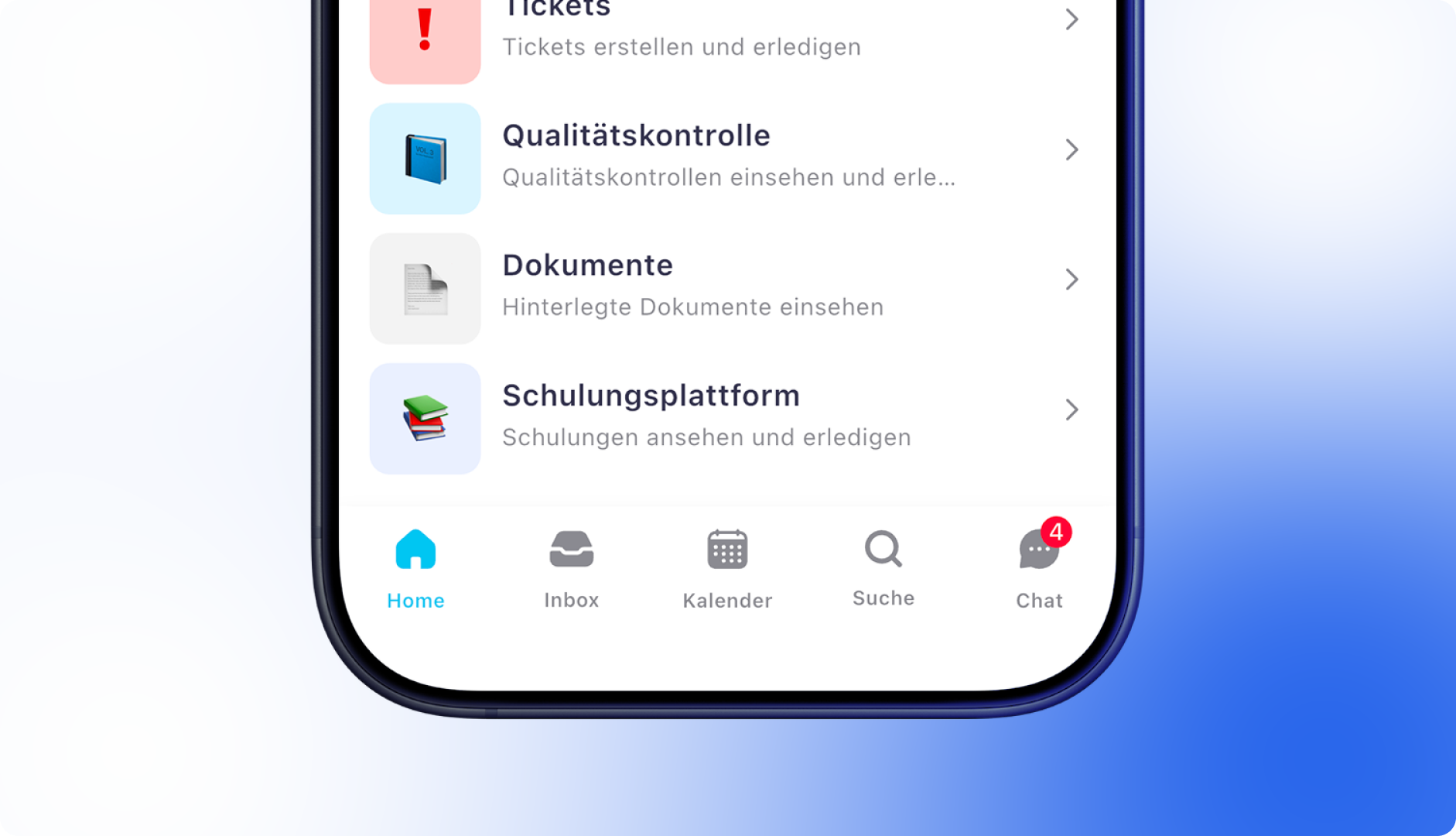
If you're already using MyTutorial, you can now integrate the training platform directly into Pland and make the training content available to your team directly within the app.
Here’s how it works:
Add your MyTutorial API key under Settings > General > Integrations
Enter each employee’s MyTutorial username in their profile under Info > Account
If you need help, our Customer Success Team is happy to assist you via chat
👉 Not a MyTutorial customer yet?
Learn more here – and don’t forget to mention that you're coming from Pland when you reach out. You can also contact Carsten Will directly (📧 [email protected], ☎ +49 2051 8031920). Special conditions are available for Pland customers.
In the “Link invoice” pop-up, the payment reference field has now been added to the payment details for better clarity.
Fixed an issue where the numbering of orders, objects, or similar entries continued from a deleted custom number. Numbering now resumes correctly from the next available active/passive number.
Improved rounding logic for Swiss rappen amounts, eliminating small rounding discrepancies.
Custom permission groups can now once again correctly view absences in the app.
Device access has been restored for users in custom permission groups.
When employees record a break in the app, a separate timer now starts and displays the break duration live.
Material order and ticket numbers are now clearly shown in the app.
The material orders and ticket lists now include a search function, available both in the full list and within the object-specific view.
A rare issue where the app froze when opening certain shifts has been resolved, improving overall stability.
July 22nd, 2025
Neue Funktion
Verbesserungen
Behoben
Dashboard
App

With the latest update, you can analyze your revenues in accounting even more precisely. The new report offers flexible filtering and breakdown options, either by gross or net amounts, and based on invoice date or service period. This gives you a clear overview – on a daily, weekly, monthly, or quarterly basis.

Breakdown by invoice status, customer, order type, or object (if assigned)
Filters for order type, status, customer, and object
Date selection: analysis by invoice date or start of service period
Gross/net revenue toggle
Flexible time axis – day, week, month, or quarter
Growth curve shows changes compared to the previous period
Tabular view with total sum based on selected breakdown and time range
Auswertung im Rechnungswesen erweitern
Language selection available:
The preferred app language can now be chosen independently of the device language via the app settings.

Hungarian added:
Hungarian has been added as an available app language and is now accessible to all users.
Translations improved:
Numerous in-app texts have been reviewed and refined to further enhance the user experience.
Shifts are now correctly hidden during absences, ensuring that employees cannot clock in for shifts while marked as absent.
The key identifier has been added as a new field in the app and is now visible within the key management section.
Passive absence types are no longer selectable when creating a new absence.
URLs, such as the imprint and privacy policy, can now be opened again reliably on Android devices.
July 17th, 2025
Verbesserungen
Behoben
Dashboard
Improved manual assignment of incoming payments
When manually assigning transactions to invoices, key payment details such as name, amount, and date are now displayed at the top of the window. Additionally, only the remaining invoice amount is shown in the invoice list – not the total amount. This makes it easier to identify outstanding balances after credits or partial payments.
Hide invoice recipient on order level
The invoice recipient can now optionally be hidden at the order level.
Set CC recipients per order
It is now possible to define a separate CC recipient at the order level, independent of the default customer setting.
Deselect items in lists automatically
When switching between statuses or views in lists, previously selected items are now automatically deselected to avoid errors when using Quick Actions.
Inventory number as column for devices
The inventory number is now available as an optional column in device lists.
Mandatory breaks are no longer considered in dynamic billing positions that are calculated based on planned time.
When opening older invoice drafts, the "Name" field is now automatically populated with the customer's name.
When creating a reminder via Quick Action, the correct letterhead is now selected again.
The layout of service reports has been improved so that letterheads no longer overlap with listed positions.
July 11th, 2025
Neue Funktion
Verbesserungen
Behoben
Dashboard
App

Key management is here! Manage your keys in the dashboard and in the mobile app. We have now added another much-requested function. If you have any suggestions for improvements, please let us know via the feature requests tab in the sidebar.

Over the last few weeks, we have been working on our interface documentation. From now on, individual workflows can be built via our API interface.
You can now select a different invoice recipient on orders! More flexibility for your invoicing process. This is particularly interesting for users who work a lot with property management companies.
“You're traveling too fast!” - is a thing of the past. We have adapted our infrastructure to enable you to work even faster.
From now on, jobs are sorted alphabetically in the job dropdown.
We have technically improved the API keys.
You can also create invoice recipients with only one email address (Error code: Contact::$lastName must not be accessed before initialization).
June 19th, 2025
Verbesserungen
Behoben
Dashboard
Delete incoming payments
Incoming payments can now be permanently deleted after being marked as ignored.
Object names in the customer dashboard
The customer dashboard now displays the object name – helpful when sending multiple links to, for example, property management companies.
Display scheduled times in the customer dashboard
In the system settings, you can now optionally enable the display of planned times for past and upcoming assignments.
Sort absences by date
All absence lists can now be sorted by the time period.
Filter by order type in time approval
It is now possible to filter by order type in the time approval view.
Various optimizations in the accounting area improve invoice dispatch (e.g. via SMTP or QuickActions), sorting of the invoice list by due date, DATEV booking batch export, and direct invoice creation via the customer.
May 30th, 2025
Neue Funktion
Verbesserungen
Behoben
Dashboard
Rounding to the nearest 5 Rappen is a commercial rounding method applied to amounts, as 1- and 2-Rappen coins are no longer in circulation in Switzerland.
The general invoice settings now include the option “Enable rounding to the nearest 5 Rappen” – but only if the company country is set to “Switzerland”.
When rounding is enabled, the total amount in quotes, order confirmations, orders, invoices, and credit notes is adjusted according to Swiss legal rounding rules. The rounding is applied exclusively to the final totals and does not affect individual line items.
Support for additional banks
Banks that do not provide an IBAN in transactions via our interface partner (e.g., Commerzbank or TARGOBANK) are now properly supported.
Note: Without an IBAN, automatic matching to customers in PlanD is not possible. Therefore, no smart suggestions for invoice matching are shown for these banks.
Outstanding invoice amount for cancelled invoices
The outstanding amount is now automatically set to 0 – as with credit notes – as soon as an invoice is cancelled.
Payroll export optimization
In the detailed payroll export, the employee's name and personnel number are now displayed at the top right of the table.

Searching for employees in the shift planner now works as expected again. All filters also behave correctly.
In the invoice list, the correct due date is now displayed for older drafts.
Multiple invoices can once again reliably be marked as paid via QuickActions.
If no booking account is set for early payment discounts, a separate (empty) discount line is now still generated in the DATEV export.
Bulk changes in the product list no longer unintentionally affect prices and VAT rates. These remain correctly set for each product.
For cancellation invoices, the sign of individual items is now correctly reversed and no longer incorrectly shown as negative.
May 26th, 2025
Neue Funktion
Verbesserungen
Behoben
Dashboard

With the new "Payment Terms" feature in PlanD, you can now control when an invoice is due and whether a cash discount is offered. This not only automates the display on the invoice but also the verification and posting of incoming payments – including cash discount deductions.
Under Settings > Accounting > Payment Terms, you can define your own conditions, for example:
Payment period (e.g. 30 days net)
Discount period and rate (e.g. 2% if paid within 10 days)
Custom invoice text that appears automatically on the invoice
Payment terms can be applied flexibly – globally, per customer, in invoice templates, or directly on individual invoices. PlanD will always apply the most specific setting automatically.
Payments with a discount deduction can be recorded either manually or automatically via bank reconciliation.
When manually entering a payment, you input the actual amount received. If it differs from the invoice total, PlanD will ask for the reason – here, you can select "discount".
During automatic bank reconciliation, PlanD checks whether the difference matches the configured discount and whether the payment was made within the discount period. If both conditions are met, the discount will be automatically accepted and correctly posted.
For DATEV export, discount amounts can be posted to a separate account. You only need to specify a discount account and activate the corresponding export option.
Selectable reason for payment difference
When entering payments manually, you can now specify a reason (e.g. discount or partial payment) if the payment amount differs from the invoice total.

Outstanding invoice amount visible in detail view
The detail view of an invoice now shows how much of the total amount is still outstanding.

Expanded filtering options in the invoice list
The invoice list now allows filtering by net, gross, outstanding, and paid amounts.
Multi-select for filter values
When filtering by specific fields, you can now select multiple values at once – for more flexible searches.
Warning for unsupported bank connections
When linking an unsupported bank, a warning is now displayed.
The DATEV export now correctly displays the associated incoming payment again.
Assigning one bank transaction to multiple invoices now calculates the amounts correctly again.
The issue when creating a product before the sales/VAT rate was opened has been fixed.
May 6th, 2025
E-invoices possible without VAT ID
X-Rechnungen and ZUGFeRD documents can now be downloaded or sent via email using only a tax number (Steuernummer), without requiring a VAT I
Sending e-invoices after missing recipient has been added
E-invoices can now be sent or downloaded even if no recipient was set during creation – as long as one is added afterwards.
Automatic recipient selection from customer profile
When manually creating an invoice without a preceding order or quote, the invoice recipient from the customer profile is now automatically inserted.
Custom fields now available in invoice export
Custom fields from customer, object, and job can now be included in the custom invoice export.
Absence types can be archived
Archived absence types are no longer available when creating new absences.
To hide archived absence types in the app, disable the option "Can be requested by employees".
Fixed an issue when converting jobs and work reports with dynamic line items into invoices.
April 29th, 2025
Verbesserungen
Behoben
Dashboard
Fixation of the posting account for newly created invoices and credit notes
When new invoices and credit notes are created, the posting account is immediately fixed - preferably the one linked to the product, otherwise the one from the associated revenue and VAT rate. Future changes to products or tax rates will no longer affect existing invoices.
Posting account logic for credit notes and cancellation invoices
For credit notes and cancellation invoices, the posting accounts from the corresponding original invoice are automatically adopted. If a credit note is created without reference to an invoice, the currently assigned account from the product or the revenue and VAT rate is used instead.
Warning for missing invoice recipient in X-Invoices
When sending X-Invoices via email, a warning is now displayed if no invoice recipient has been specified.
Employee number in the filename of the detailed payroll export
When exporting the detailed payroll report, the employee number is now automatically included in the filename.
Absences across months are now correctly considered in the SBS payroll export.
Devices now correctly reappear in custom permission groups after the group is saved again.
Custom fields on contacts and devices are reliably saved again.
The device list now correctly displays devices even if an associated object has been deleted.